a better search for max devices
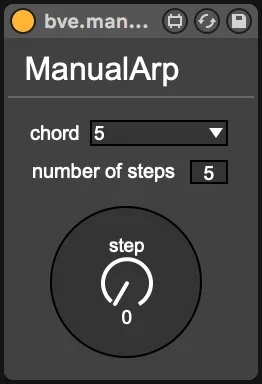
bve.manualarp screenshot

bve.manualarp

by ithkaa

arpeggiate incoming notes (and chords) in accordance with th...

View on maxforlive.com

Type
MIDI Effect
Author
ithkaa
Version
4.0
License
None
Live version
10.1.30
Max version
8.1.8
Downloads
880
Updated
2021-01-30

Description

arpeggiate incoming notes (and chords) in accordance with the steps of the selected chord

Comments (9)

  • wakax · December 30 2020
    thanks! I really apreciate your latest uploads. great stuff!!!!
  • ithkaa · December 31 2020
    @wakax thanks! Planning to share a couple more devices so stay tuned
  • sleepcycle · January 02 2021
    How should this be setup? I insert the device before Analog and play a Chord but no Arp comes out.
  • ithkaa · January 02 2021
    @sleepcycle insert the device before an instrument and play a note/chord in a MIDI clip or on your keyboard. While playing, move the ‘step’ dial to step through the notes of the selected chord/octave.
  • acapello · January 28 2021
    Not working for me either. I insert the device before Operator, I play a chord and move the ?step? But nothing happens.
  • ithkaa · January 28 2021
    @acapello I forgot to freeze the device before uploading. Try downloading it again and let me know if it works now ...
  • macdonald · January 30 2021
    Looks really interesting, but I can't get it to work.
  • ithkaa · January 30 2021
    @macdonald I uploaded a new version. Should be fixed now. Let me know if it's still broken ...
  • kikkoman · September 08 2023
    Love this idea! I tried modulating the step parameter with an LFO and it wouldn't go past 5 steps, regardless of the 'number of steps' setting, and I had some stuck midi notes once in a while. Would that be an easy fix? thx!

← Back to search