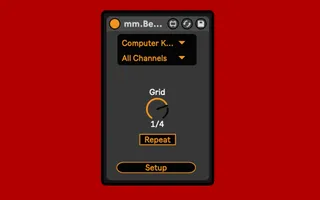
mm.Beat Repeat Control
Control Live's Beat Repeat device inuitively with MIDI note...
- Type
- MIDI Effect
- Author
- MessinkiMusic
- Version
- 1.0
- License
- None
- Live version
- 11.1.1
- Max version
- 8.1.5
- Downloads
- 0
- Updated
- 2022-04-05
mm.Beat Repeat Control is a MIDI Effect for Ableton Live by MessinkiMusic, distributed as freeware, with no license specified by the author. It targets Live 11.1.1 and Max 8.1.5. Published 2022-04-05.
New to Max for Live? Read what MIDI Effects do, how device licenses work, how to install a device.
Description
Control Live's Beat Repeat device inuitively with MIDI notes.
2 Devices
mm.Beat Repeat Control
(Live 11 only) Place the device to the left of a Beat Repeat device and choose the midi input from the dropdown menu.
mm.Beat Repeat Control MIDI
(Any version of Live) Place device on a MIDI track and press the 'Select" button, then press the 'grid' parameter of the Beat Repeat that you want to control. Notes that are used as triggers are muted by the device.
Setup Window
Popup window that controls which MIDI notes trigger each 'Grid' repeat speed. Choose from 3 default mappings using the 'Fill Triggers' dropdown menu, or create your own mappings by pressing a 'Learn' button. When a 'Learn' button is active, the next MIDI note received by the device will be mapped to that grid parameter.
Use the 'Transpose' buttons to shift every mapping up or down.
Fill Triggers Dropdown
Presets:
C1 Pads
For use with a 4x4 pad controller, where the bottom left pad plays C1.
C1 Chromatic
For use with a keyboard controller.
All Off
Turns all triggers off.
All mappings are saved with the Live set
email me at [email protected] with any questions/suggestions