a better search for max devices
DrumGates screenshot

DrumGates

by Gross9978

1.1 Added UI scaling DrumGates uses the UI from my 3G...

View on maxforlive.com

Type
MIDI Generator
Author
Gross9978
Version
1.1
License
AttributionNonCommercialShareAlike
Live version
12.2
Max version
9.0.7
Downloads
594
Updated
2025-06-22

Description

1.1 Added UI scaling

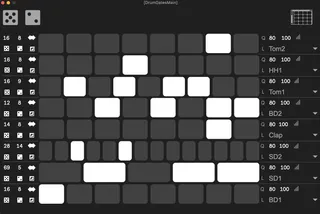
DrumGates uses the UI from my 3Gates tool for creating drum patterns.

In a popout window, clicking the drum rack icon will populate the menus on the right with the first 16 cells of a drum rack on the track. Clicking on a square will create notes for than cell.

Each lane has controls for-

Left Side-

Total notes created.

Length of the pattern to repeat within the total amount.

rotate

randomize

scramble

invert pattern

Right Side-

Q- quantize the notes to the current grid.

L- makes note legato.

Velocity Range.

Drumrack cell to use for pitch.

Its makes it pretty quick and easy to make polymeric type patterns.

Comments (13)

  • Trotskysghost · June 12 2025
    Looks interesting - downloads but then doesn't open in Ableton...
  • Trotskysghost · June 12 2025
    Looks interesting - downloads but then doesn't open in Ableton...
  • carlosbtlr · June 12 2025
    This is incredible man, the floating window makes it feel like a plugin, and the generator itself leaves all the drum pattern plugins I've tried in the dust.
  • carlosbtlr · June 12 2025
    Only thing I would add is global controls to set all the individual parameters like quantization, legato, velocity range, steps number, subdivision and invert from all the lanes at once like you did with random and scrambler.
  • Gross9978 · June 12 2025
    Trotskysghost ,make sure you’re on live 12.2?
    Carlos, yeah that’s a good idea haha
  • GiantEar · November 18 2025
    Loving it!
    Maybe a wee bug tho: Adjusting the velocity range on a single row of notes seems to change the velocity range of notes on OTHER rows.
  • Gross9978 · November 18 2025
    Glad you dig it:)  The range of other lanes shouldn’t be affected but it’s probably re randomizing the velocities every time anything gets changed on the ui. I’ll check it out one day when I get a chance:)
  • GiantEar · November 18 2025
    Ah yes, it looks like your are right, randomizing.
    One feature "request" would be a Clear button on each row.
    Thanks for making this, and for giving it away. Very generous.
  • Gross9978 · November 18 2025
    Yeah for sure man:) thanks for the suggestion:)
  • Calagan · November 24 2025
    Like others I can't use it in Ableton Live 12.2.
    It says it contains midi tools and midi tools can't be used as devices in Ableton live. 
    ????
  • GiantEar · November 24 2025
    It is in fact a "Midi Tool". Add it to the folder with other Midi Tools, then it will appear as an option in the Generative section.
  • carlosbtlr · January 20 2026
    I'm loving this device Greg, but I'm trying to enable key mapping for the button that opens and closes the popup window so that I can open and close it more quickly inside of Live, but it won't let me key map it, even though in the Max inspector it says that the button is visible to mapping. Another great improvement would be a set of global controls like the ones you did for randomization and shuffling, but for the other parameters like total steps, steps, rotation, inversion, legato, quantization and velocity range.
  • Gross9978 · January 21 2026
    Yeah I think that’s a current limitation with the key mapping , same as midi mapping as far as I know?
    It works on the stock ones but not the custom ones I think.

← Back to search