- Type
- MIDI Transformation
- Author
- Gross9978
- Version
- 1.1
- License
- AttributionNonCommercialShareAlike
- Live version
- 12.2
- Max version
- 9.7
- Downloads
- 246
- Updated
- 2025-06-30
RandChop is a MIDI Transformation for Ableton Live by Gross9978, distributed as Creative Commons Attribution-NonCommercial-ShareAlike. It targets Live 12.2 and Max 9.7. On maxforlive.com it has 246 downloads. First published 2025-06-22, last updated 2025-06-30.
New to Max for Live? Read what MIDI Transformations do, what the AttributionNonCommercialShareAlike license means, how to install a device.
Description
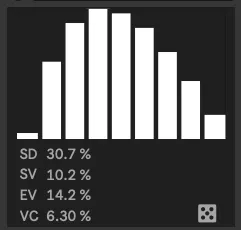
1.1- added a display for the number of subdivisions, I got tired of counting them haha
RandChop is a MidiToolTransformer a lot like my other device RandFlam, it does something other tools already do but lets you apply a deviation amount to the result.
Clicking or dragging up/down on the white square will set the amount of subdivisions to divide the notes into.
Holding OPTION on Mac (or windows equivalent) and clicking/dragging up/down on the left or right side of the square sets the Start and End velocity.
With only one side adjusted it creates a linear ramp up or down for the velocity, with both sides adjusted it creates a bell shaped curve with the midpoint dependent on the values.
Holding SHIFT AND OPTION (or windows equivalent) and clicking/dragging left or right on the square transitions the curve from Exponential to Linear in the middle to Logarithmic.
DoubleClicking with any of the above key combos will reset that value to its default.
Under the square are values that set a per note deviation amount for the Subdivisions, StartVelocity, EndVelocity and VelocityCurve. The dice will rerun the randomization each time it's clicked.
Depending on the settings you can get anything from no deviation to extreme deviation for each note.