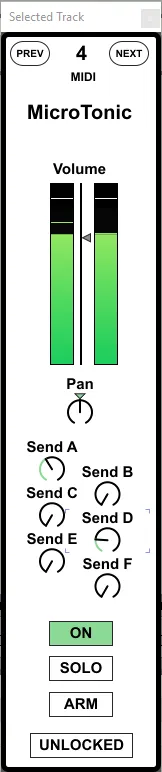
Selected Track
Displays the channel strip of the currently selected track i...
- Type
- MIDI Effect
- Author
- mothergarage
- Version
- 1.2
- License
- AttributionNonCommercial
- Live version
- 9.7.5
- Max version
- 7.2.2
- Downloads
- 833
- Updated
- 2018-02-02
Selected Track is a MIDI Effect for Ableton Live by mothergarage, distributed as Creative Commons Attribution-NonCommercial. It targets Live 9.7.5 and Max 7.2.2. On maxforlive.com it has 833 downloads. First published 2016-05-01, last updated 2018-02-02. 4 user comments below.
New to Max for Live? Read what MIDI Effects do, what the AttributionNonCommercial license means, how to install a device.
Description
Displays the channel strip of the currently selected track in a floating window.
Map its parameters to a controller.
V1.1: Added buttons for Arm, Previous and Next Track. Added Indicator if the selected track is an audio or MIDI track. GUI updates.
V1.2: Added Solo button. You now can lock the device to a track, so it stops following the selected track. GUI updates.
Updated version 1.3 found here: http://www.maxforlive.com/library/device/4530/selected-track
Comments (4)
you can close your track info to see more clips ... and the selected track is hanging next to the ableton window ... Great really love this
would be awesome if you could add a second one and lock it to another track for my dj setup ...
Great work!
@rythmhead: According to the LOM (https://docs.cycling74.com/max5/refpages/m4l-ref/m4l_live_object_model.html)
"Smoothed momentary peak value of left channel output meter, 0.0 to 1.0. For tracks with audio output only. This value corresponds to the meters shown in Live."
on OSX:
if your have a rotated screen that is 'higher' than your "main screen" (the one with the menue bar in the screens preferences)
-> the Selected Track Window shows up too high and you cannot reach the Top Bar to move it.