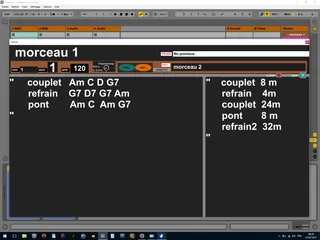
MIKADO Scenes Kontrol and Monitor v55
Update V5 Scènes Kontrol Monitor Monitor sce...
- Type
- MIDI Effect
- Author
- spiralune
- License
- None
- Live version
- 9
- Max version
- 7.3.5
- Downloads
- 197
- Updated
- 2018-08-17
MIKADO Scenes Kontrol and Monitor v55 is a MIDI Effect for Ableton Live by spiralune, distributed as freeware, with no license specified by the author. It targets Live 9 and Max 7.3.5. On maxforlive.com it has 197 downloads. First published 2018-08-08, last updated 2018-08-17. 1 user comment below.
New to Max for Live? Read what MIDI Effects do, how device licenses work, how to install a device.
Description
Update V5
Scènes Kontrol Monitor
Monitor scene name: curent, next, preview,
PERSISTANT SAVE ET RELOAD TEXTE
WITH SCENE
YOU CAN REORGANISE SCENE ORDER WITOUT LOSE TEXT
Put on midi track
just select a scene , clic reset
type a text " " and clic save ..
you can change text any time just clic save
-------------------------------------------
receive MIDI IN PROGRAM CHANGE from midi keybord
to recall SCENE
((block ProgChange = do not send to instruments rack and vst in a chaine ))
and ASSIGNABLE PREVIEW NEXT SCENE
PROG CHANG 0 IS ALWAY TRIG FIRST SCENE
progchange 3 always trig scene 4 independently to her name
now , you can drag and reorganise scene
to assigne scene at a specifique external midi Program Change
so only firts 128 scènes is usable with Program change
prog= 0 to 127
Button assign to midi note or midi CC ((no noteoff))
if your controller need::
double clic to work corectly
or clic once jump two scene
when clic ""inc /dec "" from contrroller
try another .. button position is save with ableton
//////////////////////////////////////////////
Good start for Use Ableton Live as Instrument for LIVE
like
Apple MainStage
or brainspawn Forte 4
-------------------------
used in conjunction with this patch
http://www.maxforlive.com/library/device/4082/mikado-chain-selector-2017
put just LEFT RACK INSTRUMENT with Chaine selector
---------------------------------------------------
Revisited patch from zangpa
http://www.maxforlive.com/library/device/449/trigger-scene
Comments (1)
I strongly need some modifications of this device for me. Ready to pay for them.
If possible please contact me
vsenichev (at) gmail (dot) com
Maybe those changes will be useful to the community also )
Thanx!