Stut-Dgrd
This device combines stutter and degrade effects. Stutter is...
- Type
- Audio Effect
- Author
- VKondakoff
- Version
- 1.0
- License
- Commercial
- Live version
- 10.0.1
- Max version
- 8.0.3
- Downloads
- 0
- Updated
- 2019-05-22
Stut-Dgrd is an Audio Effect for Ableton Live by VKondakoff, distributed as a commercial (paid) device. It targets Live 10.0.1 and Max 8.0.3. First published 2019-01-30, last updated 2019-05-22.
New to Max for Live? Read what Audio Effects do, what the Commercial license means, how to install a device.
Description
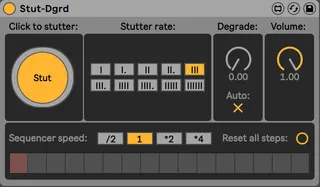
This device combines stutter and degrade effects. Stutter is a kind of a granular repeater, which repeats a last chunk of audio at user specified rate. Degrade reduces the sampling rate and bit-depth as desired. You can stutter your audio manually by clicking the Stut button or sequence it using built-in 16-step sequencer with variable speed. Set degrade effect to Auto to synchronise it to the stutter rate or control it manually.
Usage: drop Stut-Dgrd onto any MIDI or audio Ableton Live track and press Stut button to repeat the last chunk of audio. Change Stutter Rate for interesting granular effects. Sequence stutter using built-in 16-step sequencer (you can select several adjacent steps to make stutter sounds longer). By default degrade effeсt is synchronised to stutter rate. Disable this by switching off the Auto toggle to control degrade manually. There is a special Volume dial, which controls the loudness of a stutter/degrade effect.
Stut-Dgrd was tested to work in Ableton Live 10/Max 8.0.3 (macOS Mojave/Windows 10).
Short video: https://youtu.be/_Gea92s2m-0
Price: $1
Version 1.0 (Jan 2019)
- Initial release
Here you can view my other M4L devices: https://gumroad.com/valery_kondakoff