StutDown
Use this device to create granular pitch-downs and build-ups...
- Type
- Audio Effect
- Author
- VKondakoff
- Version
- 1.0
- License
- Commercial
- Live version
- 10.0.1
- Max version
- 8.0.3
- Downloads
- 0
- Updated
- 2020-05-08
StutDown is an Audio Effect for Ableton Live by VKondakoff, distributed as a commercial (paid) device. It targets Live 10.0.1 and Max 8.0.3. First published 2019-02-01, last updated 2020-05-08. 2 user comments below.
New to Max for Live? Read what Audio Effects do, what the Commercial license means, how to install a device.
Description
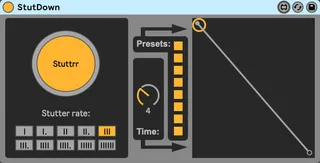
Use this device to create granular pitch-downs and build-ups. You can set the envelope, envelope duration (from 1 to 10 seconds) and the stutter/granular rate, which is synchronised to Ableton Live tempo. 8 slots for user-defined presets are available.
Usage: drop StutDown onto any MIDI or audio Ableton Live track, make some sound and press Stuttrr button to start granular pitch-down or build-up. If the envelope goes from 0 to 1, the pitch will go up. If the envelope goes from 1 to 0 the pitch will go down. An envelope set to a horizontal line will produce a static pitch. Click the envelope window to ctreate new points, shift-click to remove available points. Use Time dial change the envelope duration (from 1 to 10 seconds). The stutter rate buttons allows you to change the speed of the looping of the sound: the more vertical stripes - the faster is the granular effect. You can save up to 8 combinations of Stutter rate, Time Dial and Envelope in the Presets section. Shift-click the slot to save a preset, click to restore the preset.
StutDown was tested to work in Ableton Live 10/Max 8.0.3 (macOS Mojave/Windows 10). Note, please, Max 8 (or later) is required to run StutDown.
Short video: https://youtu.be/pfwoZ4jiBts
Price: $1
Version 1.0 (Feb 2019)
- Initial release
Here you can view my other M4L devices: https://gumroad.com/valery_kondakoff
Comments (2)
Maybe it's beyond the scope of the device, but could be interesting if there was a hold mode and repeat length. Eg, one could activate hold and with a default repeat length of 1x, it effectively loops the envelope continually. But it could be set at a multiplier. Eg 2x would mean that the envelope stage would run, and then the signal would be dry for the same length of time, and then activates again and so on.