Futility
Futility v4 is a MaxForLive device that gives you very handy...
- Type
- Audio Effect
- Author
- Crampe
- Version
- 4.2.2
- License
- Commercial
- Live version
- 9
- Max version
- 8
- Downloads
- 0
- Updated
- 2024-12-03
Futility is an Audio Effect for Ableton Live by Crampe, distributed as a commercial (paid) device. It targets Live 9 and Max 8. First published 2019-02-06, last updated 2024-12-03. 78 user comments below.
New to Max for Live? Read what Audio Effects do, what the Commercial license means, how to install a device.
Description
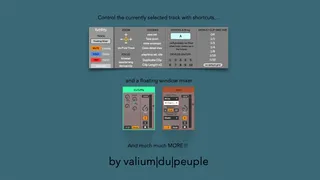
Futility v4 is a MaxForLive device that gives you very handy shortcuts that aren't natively implemented into Live.
It also provides a floating mixer window.
It works on the currently selected track:
- un/mute the selected track
- un/solo the selected track
- un/arm the selected track
- unmute, unsolo, unarm every tracks
- show/hide the envelope/modulation tab in the detail clip view
- un/fold the selected track
- un/zoom the selected track vertically and horizontally in Arrangement
- toggle play/stop the selected clip (in Session)
- automatic track arming option
- focus to the browser/arrangement/device view (useful for navigating with your keyboard's arrow keys).
- quickly move your selected clip to a new Lane (requires Live11)
- save your Live Set from a midi controller.
- close the device/clip view
- "Devices Switchers" are shortcuts to turn on/off the first 10 devices/plugins in the selected track's chain.
- "Track Control" is a floating mixer that opens up at your current mouse's location!
- Duplicate Clip
- Clip Length x2
- Devices AB'ing
Release notes:
v4.2.2:
- added Default Clip Grid Size
- automatically play the duplicated clip
- Sends in the Floating Mixer were broken
v4.2.1:
- removed kill solo/mute/arm track count limitation - added Duplicate Clip
- added Clip Length x2
- added Devices A/B'ing
v4.2:
- dashed some [receive] to prevent unwanted interaction with other M4L devices
v4.1:
- floating window optimization
- general clean up that prevents unwanted entry in Live's Undo history.
- added shortcut button to close the device/clip view(s) (equivalent to cmd+alt+L / Shift+F12 that has been removed in L12)
- GUI changes
- (kill)mute is not blocking the Undo history anymore
- muted tracks are not unmuted anymore when launching a set
v4.0.4:
- some users were getting unmuted tracks when loading a set
v4.0.3:
- now fully Apple silicon compatible
- tweaks to prevent unwanted tracks unmuting at set's launch that a few users sometimes still experience
v4.0.2:
- the Focus buttons would need to be pressed twice.
v4.0.1:
- muted tracks could get unmuted when opening sets.
v4.0:
- new Track Control floating window
- new "Devices Switcher"
- « kill mute » and « TakeDown » (and a few other bits) stability improvements.
Live 9/10/11 /Max 8 minimum requirements
Comments (78)
I've noticed the horiz zoom is less responsive than in Futility II, is it for the different coding?
One is that the automation for recording gets disarmed during playback, making recording automation useless.
- and I wanted to use this for automating recording for the track I have it placed on instead of switching to arm tracks I select.
This device is not meant to record e.g Mute automations but to add missing shortcuts to get a better mousiness workflow.
So what's happening here is that you're recording automation for the e.g Mute button of Futility, which creates a conflict when playing back afterward.
The buttons on the device have to be automatable to be key/midi mapped, that's just how M4L works, but that's not the point of this device.
I'm gonna edit the device's description to make this clear and warn about automations.
It's also not meant to be used on a single track, but globally. It just works on the currently selected track.
cheers
good catch! I'm fixing this, thanks for letting me know!
but my macbook ssd harddrive just died and i've lost a bunch of files not being able to recover. if i wrote you my purchase email along with my paypal email (with which i've paid your devices) could you please re-send me my purchased devices?
i just need an email address from you to which i could send my "proof". or are you also active on e.g. muff wiggler where i could send you a pm?
Yeah for sure. PM me from the ableton forum maybe? My username is Valiumdupeuple. or by email by adding tete-de-son.com after Valiumdupeuple and @, of course.
every time i use futility to mute/unmute a track I lose my ability to undo before I did that. It just gets stuck in a infinite cycle of muting and unmuting every time I ctrl+z
meaning if I delete an audio clip on a track and then I use futility to unmute/mute the track I can't ctrl+z back to the point before I deleted that audio clip
(this also applies for when i use it to solo a track)
If im stupid or doing something wrong please let me know, If not, this is a huge deal breaker for me
I'm running Live 9.7.7 on windows 7 if that matters.
I'll have a look at this issue and post an update. I think I know what's happening.
I had a quick look yeah, but the problem is not lying where I thought... which is totally weird. Might be a Max bug that happened during patching.
Anyway, I just need to have a deeper look at my patch... but I didn't really had time to do it, sorry. Will do asap.
(btw, this bug also personally annoys me...)
Sorry about my lack of feedback about the mute/undo issue.
I tried to solve this, and it should have been easy... BUT, at the moment my conclusion is that we're facing a silly Live/M4L bug actually.
The issue doesn't make sense at all, and the reason why I think it's a bug is that, if muting is a problem then soloing and arming should too as all these 3 functions are patched the exact same way.
I need to get in touch with ableton about this.
sorry for the inconvenience.
I used the V2 frequently the last years. Thanks for the tool. One thing that bothered me a lot was that after reopening the project all my mute/unmute stats where gone. In other words all tracks where unmuted even if that wasn't saved in that state. In the composing stage I mute a lot of different ideas and leave the main groove working. Opening up you have to guess again what was muted as backup or different version.
Is it still the case with 3.2?
thanks
Yeah it's fixed in v3 :-)
Arm and solo doesn't have this issue. Whats wrong?
there was an issue with the Mute feature that used to block the undo history.
Honestly, I never understood what's the reason for this bug, and why it only affects muting and not soloing/arming... the patching is similar for all of them.
So I came up with a workaround fix... apparently this created a new bug, at least for you.
I'll have a look asap.
sorry for the inconvenience.
For now the plugin unfortunately not usable for me. Hope you can find a fix for it. Greetings
sorry to hear that.
You should try using Futility within an empty set containing just one track, no other plugins, remote script etc... And see how it works. There's probably something conflicting with Futility in your setup.
It seems like a very few people (not even 1%!) are experiencing this problem. That's really bugging me out.
I have to think of an other way of using buttons for key mapping.
Stay tuned, and sorry for the hassle.
I'm speaking for sole key mappings in Futility here which I want to use.
I got Mackie protocol running (could interfere)
I run Studiomux (midi/audio connection for iOS - but not using this for the actual cases but its active)
NOB and Powermate controller that emulate mouse behavior (less likely)
I try to test the scenarios disabling those tools when I got time.
This is a 5 minute fix so bear with me as I dont know the fuck about max coding basics. It just works and I can go on. The bug made me nuts..
The screenshot I made is pretty clear. Just open it up in max4live and save it afterwards. You can do it while you're running Live too, but save you project first maybe...
https://ibb.co/vc8jLMc
Mike – I opened it up and tried your solution. Works, thank you! The only difference between the Mute button and the Solo/Arm buttons now is that a fairly quick double-press of the Mute button key will not register as it does with the others. You can see the behaviour is different when you mouse-lick the buttons on Futility as well. Weird, but not a huge drawback. Also, though I don't know about M4L routing, the bug seems particularly strange considering the routing of the three buttons was identical before this fix.
As for the browser/arrangement/device issue, they are functioning as toggles instead of momentary buttons. I don't know enough to do anything about that, but Crampe, if you can switch that button mode it would solve it I think!
You're right. I never toggle mute that fast to be honest. More bar wise. But your solution is definitely working better in that regard. Just as simple as that. Thanks for the share! In the meantime I reduced the plugins interface as I have lots of stuff going on on my master channel and the space is tight.
https://ibb.co/6Bz7rjz
Well, nice to hear about your simple tweak. I'm now wondering why did I really need to put this "0" message here. I have ideas about why, but it doesn't seem necessary at all except for visual reasons (which don't really matter)... So what REALLY was in my mind??
Anyway, thanks for you help, I'm going to push an update of the device.
cheers
vdp
I'm having the same Double-Tap Mute problem, just wanted to throw that out there. But that's not a deal-breaker.
What is though, is that every time I click a Group channel or master channel, the max for live error console pops up (and I have a lot of groups in my track) because these tracks don't have a mute option, so the device freaks out. The amount of times this error console pops up renders the device not worth it because it takes longer for me to close these consoles than it does for me to manually solo/mute etc.
Is there any way you can make it so the console doesn't pop up? Maybe mute all errors option or anything. I paid for 3.2 but I'm not using it because of this :(
O
Sorry to hear that. The poping Max console isn't due to Futility (the error message is, but it's not an issue in itself).
It pops-up because of another Max device in your set. Granulator use to do it. If you're using it please update to the latest version which fixes this.
If it's not Granuator then you need to find which device is involved.
Let me know...
Yeah something's happening so it creates an undo step. I can't really do anything about this, it's on the M4L side unfortunately.
That's actually weird because I just tested and I don't get any undo from the auto-arm feature...
There's probably a trick that I forgot :-)
Anyway, there's surely something else involved in your case.
I can solo, mute, and arm tracks but can't kill them.
Here's the error message from M4L.
Any workarounds?
https://imgur.com/W4VHDMH
sorry I'm only noticing your message now. Are you still having this issue?
I can solo just fine, but I can't kill solo at all.
https://i.imgur.com/Jo0HCJZ.png
What's the issue?
What are you mapping the kill buttons to? computer keyboard? Midi controller?
Does it work if you click one of the kill button with the mouse?
and it doesn't work when i click it with mouse either
The notification system from maxforlive.com has never worked for me, and it's still isn't.
I talked about this to someone (can't remember her name) from Cycling a year or so ago when they took over the site, and it was apparently a known issue.
This mute issue is driving me crazy. Thanks for the quick alert.
keep up the good work :)
Could you at least tell us how to re-route Futility so it doesn't kill the muted tracks? I'm having to open multiple different projects just to correct all of them...
you need to use v3.2 to avoid the mutes killing when opening a saved set.
I just sent everyone the v3.4 update,
make sure to check your spams!
cheers
ValiumDuPeuple
The mute killing problem still exists in Live 9.7. Should we wait for the fix or just use v3.2?
Thanks
This was fixed in v3.4 that you should have recevied a couple weeks (or so) ago I think. Check your spams if you don't find the Gumraod email with the updated device (or drop me an email if needed).
I reckon I completely forgot to check it with L9, but it should be ok.
cheers!
Thanks
no it's not expected. Is it also happening when re-opening a set?
Do you have Futlity saved in your template set so you don't need to drop it into every time you create a new set?
I have a similar problem like dubengine. I've saved Futility to my template but now every time I open a new live set the 'save live set' pop up screen shows up. Is there something I can do about this?
Which Live/Max version?
I have an idea where it's coming from, but I can't repro here on osx.
waiting for the loader update (:
Regarding LoadeR, it's not entirely up to me to make it fully m1 compatible, but I'm doing my best to make it happen as fast as possible.
yes I'm aware. It's on my todo list for the next update ;-)
- "It would be cool to have a switch that could enable finer control, without the need to hold shift." I agree 100% with this.
- I would be awesome if you could do increments +/-.5db for the selected track. Similar to your ClipGain plugin.
Any progress on the "0.0dB" error?
- let us control the currently selected Tracks Fader (=Volume), with the option to set the Maximum value of the Fader, so the maximum position of the midi assigned controller Fader won't be forced to be +6db, but could also be +0. :)
- let us control the available Sends of the selected Track (or at least 3 Sends).
Thank you! :)
"- let us control the currently selected Tracks Fader (=Volume), with the option to set the Maximum value of the Fader, so the maximum position of the midi assigned controller Fader won't be forced to be +6db, but could also be +0. :)"
>> Interesting idea, will think about it.
- "- let us control the available Sends of the selected Track (or at least 3 Sends)."
>> It's already possible via the floating window ;-)
Live 11.3.1 / M1 Max 13.6.2
Keep up the good work!
not possible, sorry.
That's normal since I didn't designed it to automatically play it.
But you know what? That's stupid, and I'm definitely adding this, at least as an option, in the next update.
Thx for pointing this out.
Can you email me? Just answer to your Gumroad receipt and it'll find my inbox.