View Toggler
Video: https://www.youtube.com/watch?v=GSZVSfNOt0I Th...
- Type
- Audio Effect
- Author
- NickHydeViolin
- Version
- 1.0
- License
- Commercial
- Live version
- 10.0.1
- Max version
- 7.3.5
- Downloads
- 0
- Updated
- 2021-05-18
View Toggler is an Audio Effect for Ableton Live by NickHydeViolin, distributed as a commercial (paid) device. It targets Live 10.0.1 and Max 7.3.5. First published 2020-02-14, last updated 2021-05-18. 1 user comment below.
New to Max for Live? Read what Audio Effects do, what the Commercial license means, how to install a device.
Description
Video: https://www.youtube.com/watch?v=GSZVSfNOt0I
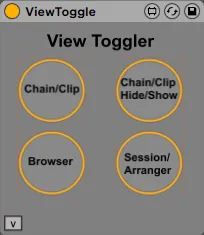
The View Toggler is a Max for Live device that allows a user to Key/MIDI map a button that toggles a view within Ableton. Toggle between:
1. Device chain/clip (piano roll view)
2. Browser hide/show
3. Chain/clip hide/show (effects/synth view)
4. Session/Arranger
Do note, there are existing keyboard shortcuts for switching views in Ableton, but this device allows you to assign specific keys or MIDI commands to it
Update 5/18/21: Updated the color scheme to look like more like an Ableton stock device.
Comments (1)