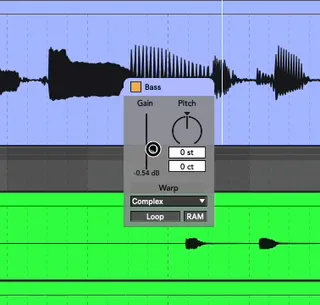
ClipGain - under your mouse
Live 11 is running great, but what about clip gain, transpos...
- Type
- Audio Effect
- Author
- Crampe
- Version
- 2.2
- License
- Commercial
- Live version
- 9
- Max version
- 8
- Downloads
- 0
- Updated
- 2023-12-01
ClipGain - under your mouse is an Audio Effect for Ableton Live by Crampe, distributed as a commercial (paid) device. It targets Live 9 and Max 8. First published 2020-11-21, last updated 2023-12-01. 114 user comments below.
New to Max for Live? Read what Audio Effects do, what the Commercial license means, how to install a device.
Description
Live 11 is running great, but what about clip gain, transpose, un/warp and more directly from the clip in the timeline?
Nope, next time maybe... Or, you can use this device, ClipGain, oh yeah! MaxForLive is your friend, as always.
Just select the clip you want to adjust, press the key/midi you've mapped to the device, and a nice little window will pop-up right next to your mouse... that's the little pop-up window you're going to love.
Of course it also works in Session view.
The device works globally on the selected clip, so only one instance of the device is needed (save it with its mapping into your template set).
SINCE V1.5 YOU NOW ALSO HAVE SHORTCUTS TO QUICKLY ADD/REMOVE A USER-DEFINED AMOUNT OF DB AND SEMITONES TO THE SELECTED CLIP
You're probably gonna like this one very much.
Video demo at the product's page, or here:
https://youtu.be/8ujTsnKlDXg
https://youtu.be/aSBxwCnPIUA
https://www.youtube.com/watch?v=hSEYpFTFxZY
Video by Decap: https://www.youtube.com/watch?v=MUZpNu95LXs
Live 9 / Max 8 minimum (it should work in L8 too, but I didn't test).
Release notes:
v2.2:
- fixes an Undo issue
- floating window opening optimization
- Few colors tweaks to ensure compatibility with L12 Themes
v2.0:
- New GUI, thanks to ELPHNT, the one and only.
- Crop can crop audio clips too (as of L11.3.20)
- Added clip's Launch mode, Launch Legato, launch quantization, RAM mode, clip mute, duplicate midi clip length.
- Everything has been collected into a single floating window
- Fixed the Rex/Pro warp mode selection bug
- Mira support. The device can now be controlled from any smartphone/tablet or even a browser on your computer
v1.7:
- New key/midi mappable shortcuts to select individual Warp Modes
v1.6:
- It wasn’t possible to select the ComplexPro Warp mode
v1.5:
- new "quick edit shortcuts" : key/midi mappable buttons used to increment/decrement the clip's gain/pitch by the chosen amount.
v1.4:
- reduced CPU usage by stoping mouse position tracking when floating window isn't displayed.
- warp mode selector was blocking Live's Undo history. It's also now shown as inactive (and can't be tweaked) when the selected clip is not warped.
- new "warp" button to un/warp from the Pitch window (for mouse only i.e not mappable)
v1.3:
- you can now change the Warp Mode (in the Pitch window). Audio clip only.
- new CROP button: can now crop midi clips (only)
v1.2.2:
- double-click (or delete key) the gain fader now resets it to 0dB, just like with any parameter in Live.
- you can't midi map the clip gain/transpose fader/knob anymore. This removes extra undo steps that were previously created by the device (and it's anyway better to midi map these directly from within Live).
- the un/warp button was blocking Live's undo history.
- some patch clean up (you might need to remap the buttons, sorry…)
v1.2.1:
- in L11beta, stretching an audio clip in Arrangement could be unresponsive "because" of ClipGain (because of M4L bug, actually).
KNOW ISSUE: un/warp blocks Live's undo history
v1.2:
- Gain and Pitch can now be opened together with a single shortcut
- new WARP button that un/warps the selected clip
- after a clip was unselected by clicking in an empty area, moving the fader/knob would still change the last clip's values. This is now fixed.
- colour tweaks
v1.1
- added new Pitch window for audio clip transposition
- gain and transpose are always observed so you don't need to close and re-open the windows for the values to be updated. It also means that you can keep the windows open all the time if you want.
Comments (114)
Is it possible to also add a Pitch knob alongside Gain Slider to control pitch?
P.S. Love your BiP device, bought it long time ago and use it ever since. Thanks for your work
I'm gonna add a transpose knob/fader in the next update.
I'd prefer having it on a second shortcut rather than in the same floating window as the current volume fader... but what's your opinion?
Personally I'd prefer having it on a same window.
Less things to map, less confusion, less shortcuts and more useful in cases when you need change Gain AND Pitch (happens some times).
Thanks a lot for the update!
I'll make it optional to have a single window for everything soon.
The fader appears at your current mouse position.
The idea is that: to change a clip's gain, no matter what, you always have to select if first in Arrangement/Session... So, the device looks at your mouse position, i.e over a clip, and opens up here so you don't have to go anywhere else to adjust your clip's gain/transpose.
The device works on the selected clip only, so it doesn't belong to any track. You can keep the device opened and select other clips to change their gain/transpose but the point of the device is to have a momentary quick access to what you need, not to have a global floating window open up at any time (it works, but it's not how I designed it, hence the non-ability to move it); select a clip > press you mapped key to open ClipGain > set your clip gain/transpose > press again your mapped key to close ClipGain's window.
Think of it like some kind of equivalent to Live's automation transform tool where you select an automation zone, right-click and then access to a list of pre-defined automation shapes. It works as contextual; ClipGain works this way.
I love this plugin, it makes my life sooo much easier when editing vocals in particulare!
I was wondering if it's possible to auto-open the pitch window to change the cents directly. I know it's a small change but it would make sooo much sense for me.
Thanks a lot again for the idea,
Mauro.
Still I've got two points if you could think about it:
I'd very much prefer to see if the clip is warped or not the same as GUI shows gain and pitch.
Second - more important one, is that in 1.2 version if I use Warp/Unwarp option, my whole history of undo changes is looped between undo/redo warped state of the clip.
undo...grrrhh how did I miss this one! Thanks for letting me now, I'm fixing this asap, and sorry for the hassle.
Adding the Warp button to the pop-up window is already planned ;-)
stay tune!
Every time I select a midi track, I get a maxforlive Error dialog with this:
live.observer: Warping is only available for Audio Clips
live.object: get path: error calculating the path
.
Also, when using this plugin; I'm unable to properly resize MIDI clips; whan I click and drag a clip's end, and let go of the mouse button, It's still adjusting the clip length, I click several times until it eventually "lets go" of the clip.
These issues did not occur in the previous version of ClipGain.
- regarding the error dialog.
I guess you're having a Max windows poping-up by its own; this isn't coming from ClipGain but from another M4L device. I mean the message itself is coming from ClipGain (but it's really not a problem) but the unwanted Max log isn't.
It's often used to debug when patching and sometimes devs forget to deactivate it when publishing their device. I know it's the case with an older Granulator II version, but it could be coming from another one. Please let me know which over devices you're having in your default set so we can find which one it is and deactivate the Max log window.
Regarding resizing, it's a M4L bug and I've workaround it in ClipGain v1.2.1 so make sure you're using this one (you should have receive a Gumraod email with the device).
You can also write me directly by answering to the receipt email you got when you purchased the device. (I'm not getting notifications from maxforlive.com, I need to come and check so I somtimes miss comments)
first of all, thank you for that great device. That's whats so amazing about m4l and people like you, it just makes ableton so much more professional and adds all these little features, that i missed for so long.
But i have some different issues here when trying to undo (cmd+z)
edits in the session. I'm only able to undo once, if i press again the clip gain of my last selected clip changes and won't change back if i hit cmd+shift+z. Don't know if anybody else experienced this bug or if it's just me but it would be awesome if could help me here, cause i really wanna use this device!
thanks in advance
ClipGain does add a few extra undo steps when you tweak a clip's parameter from it, but then you just need to hit cmd+z once or twice more.
That's the kind of little annoyances that such M4L "workflow hacks" device can produce, but that's the price to pay I guess.
TL;DR hit cmd+(shift)z again if your last step isn't undone yet ;-)
No more extra undo steps!
A little suggestion: It would be great if we could scroll up and down with the mouse to increase/decrease the clip gain. ;)
unfortunately this is not doable, sorry :-(
About the last update: I can't seem to get that new CROP function to work.
Any explanation would be welcomed.
Thanks again!
the Crop feature only works with MIDI clip.
Key/midi map the CROP button.
Now, if you modify the clip start/end and/or loop start/end points of a clip, press your new shortcut and it will crop the clip.
It works both in Arrangement and in the piano roll; in Arrangement you can also use the native cmd/ctrl+j to consolidate, that will give you the same result (but consolidate doesn't work in the piano roll, hence this CROP feature).
Btw very nice products all of them
Unfortunately the (weird) way M4L interacts with keys and keymapping makes this impossible. Sorry.
-its not transparent enough to see the clip behind (especially short ones). maybe its better to make it more transparent or set it beside a clip (above, below.. etc)
-you have to press the same button again to hide it (and double click another clip to focus that). after you set your volume or pitch it would be cooler to just click in the playlist (or other clip) and the fader disappears/hides.
-the volume fader is too sensitive (i know hold shift makes it less sensitive but thats another extra step)
-the volume fader should only be set by dragging and not by clicking. makes it feel much more precise
thanks for these :)
I don't have Big Sur so I'm not sure about what you're describing.
- not transparent enough? I don't agree but that's totally subjective and depends on soo much user settings/preferences (your screen, the Live theme you're using, your sight [e.g I'm colourblind] etc...) , and I think you're the 1st one mentioning it but I could look at adding a user setting for this. Thanks for the idea!
- I can't do anything regarding the focus thing, sorry neither do I regarding how M4L deals with key mapping (which is already quite a nightmare when you're using it to add shortcuts to Live), sorry.
- using Shift is the only way to go...
- same here, that's how the GUI objects work, I can't do anything.
cheers!
just realised two things
when +-1dB gain is mapped to a key +1 works as it should be but -1 lowers vol -1.18dB down.
and also when pitch is mapped to a key and try to undo - it duplicates the amount. but when you keep pressing it will undo (:
Thank you for this device.
When I right click to save as default, I do not see the save as default option in the drop down menu.
Is the only way to save the device with the Keymaps, to save it in the default Ableton template?
Best,
Nkektarios.
M4L devices don't have a "save as default" option. But the settings are saved by the Live Set, so yes, save it as part of your default template.
(of course, you'd need to set the device in your old sets, but I can't tdo anything about this)
First of all thank you for your great M4L devices! You make so many essential tools for me that have been great investments and create perfect workarounds for Ableton's shortcomings.
I have some suggestions regarding ClipGain which I use all the time.
1) GUI
I think the device would be even easier to use if the pop up window was twice as big or more. It's a little too small imo compared to the rest of the interface. And since it's what you're working on when you use the pop up window it would be great to have a bit more focus on it.
I would love if there was no colours in the interface, just transparent grey color. It's a small thing but often it's really ugly when the yellow and blue is mixed with the colours of the live set. Maybe just a light grey for volume and a slightly darker grey for the pitch section. It would make it look so much better I think.
Lastly, would it be possible to choose whether to see the warp modes when choosing 'All'? I never use it and it makes the GUI more cluttered.
2) USE
I don't know if it's possible but if the 'cent up' and 'cent down' could be mapped as well that would be spectacular! I would use that all the time when editing vocals and other recordings.
Also if it's possible to add a reset button for both gain and pitch I'd use that all the time too.
Lastly, and actually the biggest improvement imo would be if the scaling of 'volume up' and 'volume down' could be the same. Right now it's +1 db upwards (which is perfect) but something like an exponentially increasing value the further you lower the volume downwards. It's unintuitive that it doesn't act the same up and down and means I'm often not getting the results I'm looking for.
Hope these suggestions find you well, and again thank you for your work. It makes Ableton a better DAW!
Best,
Esben
One issue I noticed, sometimes if the clip warp mode is set to Complex Pro, it shows REX in the popup. Event hough it still shows Complex Pro in the Clip info Section. So, it doesn't affect anything, just shows the wrong Info. Even if I change it back to Complex Pro in the pop up, it usually goes back to showing REX if you close and open the popup. It's weird, because they are WAV files, not even REX files.
the window appears at your current mouse position.
@TcTT
yeah, that's just a GUI bug, nothing to worry about, and it'll be fixed in the next update ;-)
don't worry, you'll get an email ;-)
I would just add 2 other shortcuts: One to reset the gain to 0dB, and another to reset the pitch to 0st.
@iopapadopoulos: unfortunately M4L doesn't offer this option atm...
@Kilowlee: excellent ideas!
You can edit the value down to 1st.
I just checked and it looks like you need to drag the number box with some more "force" than expected because otherwise it would get "stuck" at 7...
Not sure why it's happening, that's weird, but if you go up and down a couple times it'll work (or edit the dB number box and go back to the st one).
I'll have a look at this, no idea when it's started to happen.
Is it possible to make it that it can edit the volume of multiple clips simultaneously? It would be good to have a multi selection and bring them down by the same amount of dB, not to the same gain but scaled if that makes sense.
Thanks for making this great time saving device :)
As mentioned several times in the comments here, unfortunately M4L doesn't allow editing several clips simultaneously...
The reason for having it in the same device might be that there is a universal hotkey for essentially doing the same thing for all clips. If I hit the hotkey on a midi clip as it is now nothing happens for instance because it's not audio. Perhaps the Gain could switch to saying Vel or velocity for a visual difference or having a different color.
If you made this you could maybe call it "Clip gain pro" or "Clip gain + midi".
Thanks for listening and thanks for your excellent work regardless.
thx for the suggestions
It's definitely not on my TODO list for ClipGain, but I'm taking notes.
Adding a shortcut for Legato in the MIDI editor would be an amazing addition if it's possible?
Yeah, I'd love to know, but M4L doesn't have access to this unfortunately.
Thank you for the device
I know, but atm I can't do anything about it. This is due to the unconventional way Ableton scaled the clips' gain fader. They're aware of this - they actually gave me this explanation - and they might or might not "fix" this in the future.
None of the popups (Gain, Volume, All) are showing up for me.
Has anyone encountered a similar problem?
are you on OSX? Using Live in fullscreen?
Bro, thanks for the feedback, but the problem was different: the plugin does not work when the audio engine of the program is off.
That is, when none of your audio interfaces is selected in the options, the volume and pitch windows will not be shown.
Pretty sure I can't do anything about it and that it's Ableton's side... fortunately there's no reason for not using any audio interface with a DAW so I'm pretty sure this is actually not a real issue ;-)
Great plugin! I have one minor nitpick. When I click on your gain slider it instantly jumps to exactly where I clicked, which can be annoying if you want to do small adjustments. Abletons gain slider doesn't do that, it stays where it is, as long as I click somewhere within the little triangle, and only moves when I actually drag the mouse.
Could you make this work?
It's exactly the same behaviour as the clip gain slider in Live here... (and btw, I can't do anything about it, that's how those GUI are designed)
Which Live version are you using?
Hmm that's odd... I'm using Live Version 11.2.7 on Windows, definitely doesn't work like the Ableton slider for me.
I however don't have a Mac machine to test :D Maybe some future Ableton update will fix this accidently? Don't know what else to try
as a workaround you can use the dB value at the bottom instead, if you slide up/down from here you won't get any jump.
p.s.
what is rex mode in warp section? ty
That's beyond the scope of the device I'm afraid, sorry!
REX is an old file format. The REX warp option actually appears in Live too, but only when such a file is selected. I decided to keep it in my device in case someone uses this type of file ;-)
Also tell me pls is it possible to make pitch shifting of more than one selected audio clip? I do lots of layering especially with tonal characteristics so it will be really cool to have the ability mentioned above. Thank u!
Thanks for the workaround, that's a good solution, appreciate it!
One more question that just came up. When I use arrow up/down on the pitch tool of CG it used to adjust the fine tuning by default. Now I must have done something that made it switch to change the semitones per default with the arrow keys. I thought maybe it just remembers the last thing you changed (cents or semitones) but now I can't change it back, I always have to click on the fine tune box.
Could you shed some light on this?
Cheers
The device works well but the m4l console just show up every time I click on a midi clip! And it's really unpleasant because it made get out of ableton every time.
Messages on the console:
live.object: Gain is only available for Audio Clips
live.observer: Gain is only available for Audio Clips
You have an instance of Granulator in your live set, right?
Make sure to update it to the latest version, they added an option to stop this Max Console window from poping up, this is a developer tool, this was left there by error.
As for the "errors", they have absolutely no impact.
the midi crop feature only works in the detailed clip view/piano roll.
Let's say you selected a part of your midi clip (in the piano roll) and pressed cmd+L to loop this area, and you don't need to content outside of the loop brackets: that's where you'd use ClipGain's Crop button.
I didn't change anything in this area, so I have no clue... Are you sure about this?
Perfect thank you!
it would be really cool if you could edit the warp parameters in the window (eg. grain size and flux for the texture warp mode) in addition to gain and pitch.
thanks again!
You've no idea how much I'd love this too!
But unfortunately these parameters aren't accessible by M4L atm...
The floating windows for gain and pitch cannot be moved.
This by design and nothing changed recently.
As per the User Guide:
"Select an audio clip, press the key(s) you’ve mapped. This will pop-up a window, UNDER YOUR MOUSE, with the clip’s gain/transpose fader/knob etc... "
This is because of the very unusual way the clip fader in Live is scaled, so when it goes below 0 the numbers aren't correct anymore.
Ableton is aware of this, but this is that way for so long that I'm not sure if they will change it anytime soon.
Too bad, but thanks for the reply!
As mentioned several times in the comments here, unfortunately M4L doesn't allow editing several clips simultaneously...
Panning is not a clip but a track property, so it has to be automated at the track level (or with a Utility), there's no way around it.
My Futility v4 device has a floating mixer window though, it exposes the currently selected track's mixer, so you can set your panning from it (it's not made to create automations, though).
Someone experienced this recently, and the reason was they were using a custom Theme. Is this your case?
Are you using Live fullscreen? If yes, right-click the Live icon in the Finder, and make sure it isn't set to a specific Dekstop/Space, i.e make sure it's set to "None".
Can you email me, it'll be easier to investigate. If you answer to your Gumroad receipt it should get to me.
It would also be super handy if the floating window goes away directly after changing the gain or pitch without having to press the shortcut again. Maybe add this as an optional function? Or the option that the floating window is only open as long as the shortcut, in my case "C" is pressed?
Love this device, but unfortunately it's not working correctly when using the (-) gain button. The values are incorrect.
For instance, if I set the shortcut to change gain by 1dB, on a 0dB clip, the first (-) click gets at -1.18, the second at 2.60, the third at 4.27, and so on. So if I want to lower the gain by 6dB, I get a 10.8dB reduction !
It must be a mistake in some operation in the treatment of negative values.
Could you correct this ?
Yep, that’s a known issue.
That’s happening because Ableton has scaled the clip gain fader in an unconventional way below 0dB.
They are aware of the issue, but it’s been like this since it exists and since it basically only is problematic in the M4L world I don’t have high hope they’ll change this (this could probably cause way too much problems with old sets, it’s risky).
And to put it shortly, I’ve tried many tricks, functions and tables and even had some help from ableton but there’s basically nothing to do other than live with it, sorry...
Only Ableton can make this happen, unfortunately.
Thanks a lot for the reply and details :)
Cheers
This would be my #1 reason for using it.
Thanks & respect.