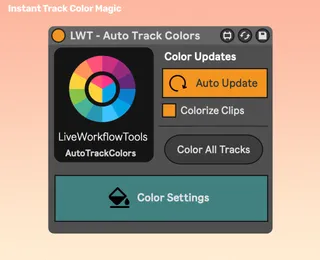
LiveWorkflowTools - Auto Track Colors
Never Manually Color Tracks & Clips Again Name your t...
- Type
- Audio Effect
- Author
- LiveWorkflowTools
- Version
- 1.8.1
- License
- Commercial
- Live version
- 12
- Max version
- 9.0
- Downloads
- 0
- Updated
- 2026-05-08
LiveWorkflowTools - Auto Track Colors is an Audio Effect for Ableton Live by LiveWorkflowTools, distributed as a commercial (paid) device. It targets Live 12 and Max 9.0. First published 2020-11-29, last updated 2026-05-08. 11 user comments below.
New to Max for Live? Read what Audio Effects do, what the Commercial license means, how to install a device.
Description
Never Manually Color Tracks & Clips Again
Name your tracks once. Auto Track Colors matches your keywords and instantly color-codes tracks and clips in Ableton Live.
Trusted by 3,000+ Ableton Live Users
Why producers use Auto Track Colors:
- Auto-colors tracks & clips: Keywords map to your favorite colors across Session and Arrangement.
- Fits your workflow: Link multiple keywords to one color for fast, consistent sessions.
- Ultra-light: Designed to stay out of the way so your session stays snappy.
- Smart Clip Coloring: Instantly sync all clip colors to match their parent track.
- Preset Ready: Save/recall your color rules as Ableton presets.
- One-Click Refresh: Instantly re-color every track with a single tap on the Re-Color All Tracks button.
- Advanced Matching: Choose from multiple word match modes to perfectly fit your naming schemes.
Setup in 3 quick steps:
1) Drop the device into your set.
2) Add keywords next to the colors you want.
3) Done ✅ Your project is now automatically color coded.
Continued support and free feature updates included. If you find an issue or have an idea that makes the device better simply send me a message!
Comments (11)
This is one of those tools that should be built-in to every DAW.
Hands down, this is my favorite workflow device I now have. It is amazing that I only just now discovered it.
Either way, well worth the $9!
Don't know who this developer is, but huge thanks to Live Workflow Tools!
- One thing I wish it adapted the 70 color hues straight from Ableton Live's color scheme instead. With its current color palette, it's hard to get certain types of Blue, Red, Orange, and many other color shades that exist in Ableton. Fiddling with the Hue panel is a bit tedious even when I sampled the hue values directly from Ableton Live's colors and copy them to Auto Tracks, I come up with pretty much misses.
- Case Sensitive only works when the field has only one word. So, in my case, where I have a field with Guitar Acoustic Electric, the device doesn't apply the color if it is set to "Case Sensitive".
- Also, I wish the naming convention recognized accent and characters. i.e, if I want to exclude #drums or +drums from being automatically colored. Currently, the device still colors any track where the words appear.
Still a great buy!
I can't seem to get it to color a track black?
Thanks
As per the above complaint; the colour pallet/picking process is pretty dysfunctional.
Would be SO much better if it just had all the Ableton colours as a default pallet, rather than boasting an infinite pallet which is then clumsily likened back to the Ableton colours..... Black doesn't even correlate to Ableton black, FFS! ...And the colour 'sample' function doesn't work properly either.
Nice idea, but poorly executed.
"swatches": [
{
"color": [1.0, 0.603, 0.667, 1.0]
},
{
"color": [1.0, 0.655, 0.255, 1.0]
},
{
"color": [0.820, 0.616, 0.227, 1.0]
},
{
"color": [0.969, 0.961, 0.549, 1.0]
},
{
"color": [0.757, 0.988, 0.251, 1.0]
},
{
"color": [0.176, 0.996, 0.314, 1.0]
},
{
"color": [0.204, 0.996, 0.686, 1.0]
},
{
"color": [0.396, 1.0, 0.918, 1.0]
},
{
"color": [0.565, 0.780, 0.988, 1.0]
},
{
"color": [0.361, 0.525, 0.882, 1.0]
},
{
"color": [0.592, 0.671, 0.984, 1.0]
},
{
"color": [0.851, 0.459, 0.890, 1.0]
},
{
"color": [0.898, 0.361, 0.635, 1.0]
},
{
"color": [1.0, 1.0, 1.0, 1.0]
},
{
"color": [1.0, 0.243, 0.251, 1.0]
},
{
"color": [0.965, 0.435, 0.137, 1.0]
},
{
"color": [0.624, 0.467, 0.322, 1.0]
},
{
"color": [1.0, 0.941, 0.329, 1.0]
},
{
"color": [0.553, 1.0, 0.475, 1.0]
},
{
"color": [0.259, 0.773, 0.184, 1.0]
},
{
"color": [0.067, 0.761, 0.698, 1.0]
},
{
"color": [0.157, 0.914, 0.992, 1.0]
},
{
"color": [0.102, 0.651, 0.922, 1.0]
},
{
"color": [0.361, 0.525, 0.882, 1.0]
},
{
"color": [0.557, 0.455, 0.890, 1.0]
},
{
"color": [0.729, 0.506, 0.780, 1.0]
},
{
"color": [1.0, 0.255, 0.820, 1.0]
},
{
"color": [0.851, 0.851, 0.851, 1.0]
},
{
"color": [0.886, 0.435, 0.392, 1.0]
},
{
"color": [1.0, 0.651, 0.498, 1.0]
},
{
"color": [0.839, 0.698, 0.498, 1.0]
},
{
"color": [0.933, 1.0, 0.718, 1.0]
},
{
"color": [0.839, 0.902, 0.651, 1.0]
},
{
"color": [0.749, 0.827, 0.514, 1.0]
},
{
"color": [0.643, 0.788, 0.604, 1.0]
},
{
"color": [0.851, 0.992, 0.898, 1.0]
},
{
"color": [0.824, 0.953, 0.976, 1.0]
},
{
"color": [0.761, 0.788, 0.902, 1.0]
},
{
"color": [0.827, 0.769, 0.894, 1.0]
},
{
"color": [0.706, 0.631, 0.894, 1.0]
},
{
"color": [0.918, 0.890, 0.906, 1.0]
},
{
"color": [0.702, 0.702, 0.702, 1.0]
},
{
"color": [0.796, 0.608, 0.588, 1.0]
},
{
"color": [0.733, 0.533, 0.384, 1.0]
},
{
"color": [0.624, 0.541, 0.459, 1.0]
},
{
"color": [0.765, 0.745, 0.471, 1.0]
},
{
"color": [0.663, 0.757, 0.184, 1.0]
},
{
"color": [0.518, 0.706, 0.365, 1.0]
},
{
"color": [0.576, 0.780, 0.753, 1.0]
},
{
"color": [0.647, 0.733, 0.788, 1.0]
},
{
"color": [0.561, 0.675, 0.773, 1.0]
},
{
"color": [0.553, 0.612, 0.804, 1.0]
},
{
"color": [0.682, 0.624, 0.733, 1.0]
},
{
"color": [0.776, 0.663, 0.769, 1.0]
},
{
"color": [0.749, 0.478, 0.612, 1.0]
},
{
"color": [0.255, 0.255, 0.255, 1.0]
}
]
}