- Type
- MIDI Effect
- Author
- SimonR
- Version
- 1.0
- License
- None
- Live version
- 10.1.18
- Max version
- 8.1.5
- Downloads
- 2,280
- Updated
- 2021-04-13
8 CC Mapper is a MIDI Effect for Ableton Live by SimonR, distributed as freeware, with no license specified by the author. It targets Live 10.1.18 and Max 8.1.5. On maxforlive.com it has 2,280 downloads. First published 2021-04-04, last updated 2021-04-13. 8 user comments below.
New to Max for Live? Read what MIDI Effects do, how device licenses work, how to install a device.
Description
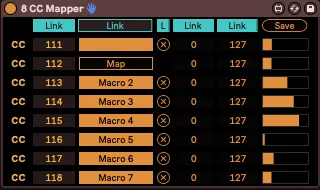
Map 8 CC controls to various parameters in Live. The Link buttons make it easy to map this to macro racks. Made to be as CPU-light as possible. For more advanced mappings, see my other device MIDI Hub.
Link : each Link button makes rows 2-8 controlled by the first row, making it easy and fast to set-up your mappings. For example, if Link button is enabled for CC numbers, the CC numbers for rows 2-8 will follow the value chosen for row 1 in ascending order.
If Link button is enabled for mapping, mapping the first row will automatically map rows 2-8 to the successive objects in Live, according to their ID number. Now, the ID number automatically attributed to objects in Live is something of a mystery for me, so this actually rarely works perfectly if you want to, say, map to macros 1-8, but it still works for most of them, so you'll just need to adjust what’s left.
Turning the device off will temporarily unmap all parameters.
Save : save the current values of all CCs on all instances in your Live Set. This is only useful for CCs that aren’t automated or for establishing the initial values of all data (MIDI data is always initialized at 0 by default). The reason it doesn’t do it automatically is because making a parameter storable in M4L automatically makes every change appear in the Undo’s history list. Therefore, if I were to make all values storable (saved within the live set), every time one of the control would move (which would mostly mean every time you press Play) there would be hundreds of Undo actions appear in its history, making it impossible to undo whatever important mistake you made if needed. Therefore, the only workaround is to save the values manually.
Comments (8)
1. i open ableton
2. i drop in 8 CC mapper onto the first audio track
3. i tap the first map button and then click on the volume fader for that track. it maps okay no problem.
4. i click the second map button then click the pan knob for said track.
5 - at this point the 2nd map button just flashes and does nothing - no matter what knob or fader i click on. and if i click any other map buttons, and then try to click any knobs/faders in live, those map buttons just sit there and flash on/off.
i can send you a video of what im talking about if you like.