- Type
- MIDI Effect
- Author
- SimonR
- Version
- 1.0
- License
- None
- Live version
- 10.1.18
- Max version
- 8.1.5
- Downloads
- 1,071
- Updated
- No Updates
Sustainer is a MIDI Effect for Ableton Live by SimonR, distributed as freeware, with no license specified by the author. It targets Live 10.1.18 and Max 8.1.5. On maxforlive.com it has 1,071 downloads. Published 2021-04-04. 2 user comments below.
New to Max for Live? Read what MIDI Effects do, how device licenses work, how to install a device.
Description
Increase the control of your sustain pedal.
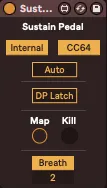
Internal : Manage the note sustain inside the device, which will hold all Note Off messages until the pedal is released. Tip : use this in front of an arpeggiator or any MIDI device to play chords larger than 10 notes or for more keyboard-playing versatility.
CC64 : Bypass or gate CC64 messages.
Auto : In this mode, the "pedal" is automatically lifted and pressed down again on the first note of a new chord (in other words, the first note after no keys were pressed down). Useful when you don't have any pedal and don't want to manually manage the sustain.
Double-Press Latch : If turned on, double-pressing the sustain pedal will latch all currently held down notes on keyboard. You can then play all other notes as usual with the sustain pedal. Double-pressing the pedal with no held down notes flushes all notes. Tip : useful for creating drone notes on-the-fly.
Map button : Map any controller to this button to act as a sustain pedal. You can also click on it.
Kill button : Kill all hung notes.
Breath : When turned on, pressing the sustain pedal will hold the current breath/wind controller’s CC value as a floor/minimum value until the pedal is released, letting you catch your breath!
Comments (2)
Cheers, Reyn.