Automation Capture
Use this device to automatically create automation breakpoin...
- Type
- MIDI Effect
- Author
- SimonR
- Version
- 1.0
- License
- None
- Live version
- 10.1.18
- Max version
- 8.1.5
- Downloads
- 448
- Updated
- 2023-06-15
Automation Capture is a MIDI Effect for Ableton Live by SimonR, distributed as freeware, with no license specified by the author. It targets Live 10.1.18 and Max 8.1.5. On maxforlive.com it has 448 downloads. First published 2021-04-04, last updated 2023-06-15. 3 user comments below.
New to Max for Live? Read what MIDI Effects do, how device licenses work, how to install a device.
Description
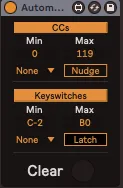
Use this device to automatically create automation breakpoints of various MIDI data in your clips.
Automation Capture stores the last values of CCs and/or keyswitch notes played on your track before recording, and then sends all those values again when you start recording in order to create breakpoints as well as KS trigger notes. This can save a big amount of unnecessary time when the state of some controls weren’t stored because they weren't moved during the recording.
NB : You need to put this device in a MIDI track and have your instruments pick up the MIDI input from that track in order to have the information stored in your MIDI clips.
CC Min-Max : Select the range of CC numbers for which you want to store values
CC Repeat Interval : those values can be sent at a repeated time interval. A small nudge (Nudge button) might be necessary to create new breakpoints each time.
KS Min-Max : Select the range of notes used as keyswitches. MIDI Capture will trigger the last played KS when the clip starts recording.
KS Repeat Interval : The KS can also be triggered repeatedly at the specified time interval.
Latch : The KS note can be sustained indefinitely.
Clear : Manually clear all stored values. Automation Capture automatically clears all data every time you arm a track.
Comments (3)