- Type
- MIDI Effect
- Author
- SimonR
- Version
- 1.3.1
- License
- None
- Live version
- 10.1.2
- Max version
- 8.5.0
- Downloads
- 8,076
- Updated
- 2024-05-10
Arp Control is a MIDI Effect for Ableton Live by SimonR, distributed as freeware, with no license specified by the author. It targets Live 10.1.2 and Max 8.5.0. On maxforlive.com it has 8,076 downloads. First published 2019-02-19, last updated 2024-05-10. 36 user comments below.
New to Max for Live? Read what MIDI Effects do, how device licenses work, how to install a device.
Description
*** Disclaimer notice ***
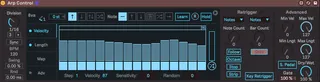
This device has been constructed upon the M4L Arp device designed by Maxforcats and available with the free Max for Live Essentials pack on Ableton’s website. My aim was to correct some malfunctions as well as to add a few new features for personal use, after which I ended up feeling like more people could benefit from it. I do not claim to have created most of what constitutes this device and will detail in the following lines what I have added and changed to the original Arp device.
To download the original Arp, follow this link: https://www.ableton.com/en/packs/max-live-essentials/#?
Maxforcats : http://maxforcats.com/
---------------
Hi all, here is my first introduction to the Max programming world. I’ve been wanting to use an arp for improvising in a live context and found the arp in the Max for Live Essentials pack more useful than the native Live one, but still found a few limitations which left me a bit frustrated. And so I decided to dive right into the programming world and it’s been a fun ride since (although a very sleepless one). So here’s what I came up with :
Improvements / Fixes :
* On Hold mode, note patterns are now created as soon as the keys are pressed, rather than when they are released (the original arp would only trigger the first note and then play all of them when you would release them). Moreover, note sequences are not retriggered until all the keys have been released and a new key or chord is pressed, making it possible to change the set of notes without retriggering the sequence, just like when the Hold button is off.
* When toggling between Sync and Free mode, the step sequencer now comes back in phase with Live’s transport on Sync mode (the steps would randomly fall out of phase when going to Free mode and coming back to Sync mode, so you had to start Live’s transport again to resync).
* Removed unwanted text from the presentation when device is off
* Fixed an error in Chord mode where one of note from the chord would get triggered twice.
* Created 7 parameter banks for controllers, with control over pretty much every important parameter including the first 8 steps, the first 8 velocity values as well as note lengths. I omitted the Map mode parameters as I don’t plan on using it.
Additions:
* Velocity and Note Length Activator buttons:
- Added toggle buttons like the Advanced mode button which toggles the velocity and note length being controlled by the steps. When off, note velocities are determined by the velocity of the last played note. As for Note lengths, when button is off, all notes are played legato.
* Velocity Sensitivity:
- When Velocity Activator is On, notes are played at the various velocities determined by each step. However, the Velocity Sensitivity slider scales the steps’ velocity towards the velocity of the last played note, according to the chosen value (at 0, all notes are played exactly as determined by each step).
* Velocity Random:
- Introduces randomness for each step’s velocity value, for a maximum range of +-64.
* Note Length Random:
- Introduces randomness for each note’s length value, for a maximum range of +-64.
* Min/Max Velocity and Note Length:
- The Minimum and maximum range set by the slider above the random trigger now also sets the output range for velocity and note length values. All values are scaled according to those 2 values (Velocity Sensitivity and Random processes come BEFORE the min/max scaling).
* Beat Retrigger:
- Inspired by the Retrigger section of the native Live arp, the Beat Retrigger section has multiple options that let you have more control over both your note patterns and step patterns.
* Note Count:
- Retrigger note sequence, step sequence or both after a specified amount of notes.
* *2 button:
- Multiplies the Note Count by 2
* Stop button:
- Instead of retriggering, stop the notes or steps after the specified amount of notes, until the next bar retrigger or until the next keys are pressed.
* Bar Count:
- Retrigger notes, steps or both after a specified amount of bars.
* Bar Quantization:
- Synchronize the retrigger with the 1st beat of Live’s transport after the specified amount of bars (if Off, the moment you press the keys is considered the 1st beat).
* Dry/Wet:
- Scales between the “dry” MIDI notes and the arpeggiated notes. At 50%, both are played at their full velocity value. However, when the percentage is < = than the specified Gate value, the dial turns pink and the arp input gate closes, letting the held notes arpeggiate indefinitely as you play on top of it.
* Gate:
- Sets the Dry/Wet percentage at which the arp input gate opens.
* Sustain Button:
- Determines whether or not the Sustain Pedal toggles the Hold button on and off.
Hope you enjoy!
------
UPDATE 1.1
- Added a Random parameter for random rhythmic variations. Inspired by the "Humanizer" M4L device, it adds random delay to all notes, ranging from a subtle and more humanized feel to a total randomized chaotic mess.
- Velocity Random is now effective on individual chord notes.
- Sustain Pedal button now behaves as toggle between Hold on and off, rather than momentary. It also filters CC64 messages.
- Added knobs for being able to map to Min and Max Velocity as well as Note Lengths outputs. All of them are linked with their respective slider (which didn't allow for mapping).
- Changed the interface for a more compact layout.
------
UPDATE 1.2
- Fixed the Sync issue
- Added Follow button for linking the Note Count knob with the number of keys pressed. Useful for arpeggiating chords when combined with "Stop", or for linking the number of steps with the number of arpeggiated notes.
- Octave button for multiplying the note count by the number of octaves selected. Replaces the *2 button.
------
UPDATE 1.3
- Fixed a bug when original Arp was loaded in same Live Set which reversed the Division values.
- Added a Learn function which enables to enter individual notes or chords in each step. More of a personal use, where I wanted to be able to create chord tremolos on the fly. Unfortunately, the notes entered with this function can't be modulated by the usual arp functions, they're just played as-is.
- Reorganized and simplified the Parameter Banks
------
UPDATE 1.3.1
- Fixed the off-sync rendering issue
Comments (36)
You should definitely send it to Christian Kleine (maxforcats).
So many arp/seq devices (even those from Ableton) are buggy.. Thanks for fixing this one and making it better!
@iloyd : thanks, will check this out, although I doubt that's something I could correct inside the patch...
Could you help me solve this mystery once and for all?
Does this happen to everyone? I've never downloaded any M4L device with presets so I can't see for myself.
See this screenshot:
https://adriaantaylor.com/live
https://www.samplelogic.com/products/arpology/
Unfortunately I got a strange glitch recently.
When i reopened a project after a couple of days your arp was replaced by the Arp from the Essentials Bundle. Funny thing is on the UI it was written 1/16 but it played 1/4 (and 1/4 where 1/16) It looks like your "Arp Control" kinda still was there.
Will let you know if it happens again...
I would love to be able to have 24 steps for jazz runs; Any chance you could either give me some help in Max to customize it myself, or include that in your next update? Thanks so much!!!
cheers n' blessings,
G
ps, I did try editing various parameters for the slider and bpatchers on my own, but am a novice and hopelessly lost.
Cheers!
sadly it keeps changing the time division when reopening a project. 16th becoming 4th for example. It is still written 16th though, just playing 4th. Like, behind the UI, it would play the original arp device where the values are flipped compared to the arp control.
Would be so great if there was a fix cause the arp has all I need. no more no less :)
I'm a max developer but I cannot easily look at the code and fix it myself, because there seems to be a lot of code to make it sync properly, even though it should be able to be accomplished easily via plugsync~ and some mod math
time division bug is gone. I guess the renaming fixed the problem. by far the best arp I know. thnx so much!!!!!
Nice work!!!!!!!!!!
Looks cool, I'll try and give some feedback but if someone knows about some bugs on Live 11 please let us know here...
this is such a great device - but no matter what (when I freeze the track or bounce out the audio):
- playback of sync or just behaving randomly even just on a single track with simpler
- Same issue with the live essentials version
What am I missing here?
Unfortunately, there doesn't seem to be an easy fix for this. I have no idea why it would go off-sync only when freezing the track. I'm not really using the device any longer and don't have the time to look into it.
If someone wanted to try to fix this, I would say the best way to go at it would be to find an arpeggiator that doesn't have that problem and compare the patching related to the synchronization with Live's transport.