- Type
- MIDI Effect
- Author
- SimonR
- Version
- 1.03
- License
- None
- Live version
- 11.1
- Max version
- 8.2.0
- Downloads
- 2,219
- Updated
- 2023-01-16
MIDI Hub is a MIDI Effect for Ableton Live by SimonR, distributed as freeware, with no license specified by the author. It targets Live 11.1 and Max 8.2.0. On maxforlive.com it has 2,219 downloads. First published 2021-04-04, last updated 2023-01-16. 29 user comments below.
New to Max for Live? Read what MIDI Effects do, how device licenses work, how to install a device.
Description
Have total control over your instruments by manipulating your MIDI data in countless ways.
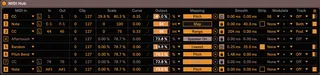
This device is based off the Expression Control device included with Live, but adds much more features for controlling your instruments or your Live Set. It can be used both for mapping and for manipulating the track’s MIDI data sent to your plug-ins. There are 8 MIDI “stations” programmed serially, meaning any changes done to the selected MIDI control’s track output will be reflected in the next station.
Switching off an individual station bypasses the selected MIDI messages and unmaps the selected parameter. Switching it back on automatically remaps to the same parameter. This way, you can map the same parameter to multiple stations and quickly change your mappings by toggling the station buttons. Likewise, switching the device off temporarily unmaps all parameters. (credits to @schlam for this idea)
Here are the main features. Every parameter is explained in more details in the info view.
MIDI In : choose between any CC or Note message as well as Velocity, Pitch Bend, Aftertouch, Keytrack and Random.
In-Out # : choose which CC or Note to control. You can optionally choose a different number as output for converting CC or Note messages.
Clip : clip the input range
Scale : scale the output
Curve : curve the output in various ways. Click the small symbol for more advanced curves editing.
Lock/Unlock mapping : You can choose to keep the mapped object unlocked if you wish to be able to control it manually or if you want to map multiple controls to the same object. Otherwise, locked mode is preferable.
Smoothing : control the attack and decay smoothing.
Strip : filter Note Off messages for Note, Velocity and Random inputs.
Modulate : Send the signal to another station to modulate it.
Mod Type : Add, subtract or calculate the average of both signals.
Track Output : Choose what to do with the MIDI track output of the selected control. Off : gate the selected control. Pre : bypass the selected control. Post : output post-fx values. Both : output both pre-fx and post-fx values (if you want to convert CC or Note messages and output both).
Additional Settings : click the Settings button for more advanced settings. You can among other things save the current values of all stations for initialization (MIDI Hub will trigger those saved values after your Lie Set is loaded).
-----
Release Log
1.01:
- Fixed a bug where mappings would get corrupted when toggling device or individual stations on/off after duplicating the device, or saving it as a group preset with mappings.
- Fixed a bug where output values wouldn't exactly match some min/max % scale numbers, like 50.0%.
- Output values now stay consistent when changing min/max scale values.
1.02:
- Added Program Change as MIDI Input
1.03:
-various improvements
Comments (29)
..but maybe you forgot something.. =)
you said to me about the unmap functionality I added to your other device last time :
"Do you allow me to integrate this feature into a new device that expands the functionalities of Expression Control? I'll be uploading it soon and it will replace this one. I like your idea! I'll credit you in the description if you agree."
j'étais agree =)
C'est vraiment pas grave, ta device est vraiment super ! mais même si tu as revu le système de l'unmap, un petit crédit aurait été normal non ?
You can try this device..it's really a sketch but maybe you can do that with it or modify it for your purpose...
https://maxforlive.com/library/device/7355/4-last-params
How does the pgm change parameter work?
At the moment - I'm using this device to route CC20 -> CC32 so I can make multiple program changes (patch changes on hardware) within a single clip.
Is there a better way to do it?
Sorry - I'm new to this midi world, so I'm just trying to wrap my head around it all.
Your device seems amazing. Looking forward to understanding it further and getting more acquainted with midi in general.
Thanks for your help with this. I am trying to send a program change message and hoped that I could cover CC messages to program changes. I've since found a M4L device called "program change" it seems to do the trick.
Thanks for your help and time.
Thanks for doing this. I use both a Roli Block and a TEcontrol so this is great for me. Just wondering if I can split AT to map to several parameters in parallel?
To clarify what i mean: I am playing notes on a MPE controller and modulating CCs with another device. With Expression Control this works, but with Midi Hub the MPE information is not passed on to the Instrument. A Midi Hub Version that allows that would be amazing!
I'm just a huge fan of your devices, seems like they the one I use a lot....;
I just switched on Macbook M1PRO... plenty of power, plenty of problems to solve...
8CC light mapper mix some mappings randomdly
Expression control ++ 0.3 mix mappings when importing a track from another projet (I can deal with it)
Midi HUB, the best device ever made (for me!) juste eating like 2.7 GB of RAM for 10 devices ( a bit too much for my (big) machine) or may be I love it too much :-)
Here it is, if you have time for improvements..someday..or should we wait for apple to get back on intel....
By the way, Thank You more than a lot !!!! Sharing theses
Cheers
Glad you're finding my devices useful! As you can probably guess, I develop them for my own purposes and share them freely, and I don't have much time to manage requests and so forth...
8CC Mapper and Expression Control I've stopped using (Expression Control basically became MIDI Hub) so I won't be updating. It's safer to simply load the devices and then do the mappings, rather than duplicate or import a template file from the browser.
As for MIDI Hub's performance, I do remember improving the CPU performance a while ago, but can't remember if it was before the updates I uploaded here... so I just uploaded the latest version I have on my computer and hopefully you'll see a bit of improvement (can't say for RAM, I haven't tested it).
I do realize that MIDI Hub can be a bit overkill if one is using less than its 8 MIDI "stations", so I created lately a device that is basically a 1 station version of it, so you get all the benefits of MIDI Hub minus the unnecessary load on RAM and CPU. You just have to be ok with having 8 instances, rather than the more slick-looking 1 instance. In the end, I think it's much more beneficial (you can always group all the individual instances together and hide them).
Message me at [email protected] if you want.
this is THE very good advice for MacM1 users !!
"8cc and Expression control works better
without duplication or preset loading"
Also, its important not to switch off the devices when saving projects or it will lose the mappings
I'll send you a small mail about the 1 instance Hub with great pleasure...
Thanks again for sharing these lovely devices !!!
for now im not getting it to work
No matter what note I put in "Out", it always outputs C-2 instead.
But unfortunately it is impossible to use it in my live, because each device takes 300-350 mb RAM. This is very frustrating, does not allow you to use it. I really hope and expect that you will optimise it for CPU and RAM one day.
Thanks and respect!
But unfortunately it is impossible to use it in my live, because each device takes 300-350 mb RAM. This is very frustrating, does not allow you to use it. I really hope and expect that you will optimise it for CPU and RAM one day.
Thanks and respect!
It seems the last Live update (12.1.10) is not compatible with your device. When I updated from 12.1.5 to 12.1.10, the set where I use your device was crashing all the time. I'm pretty sure your device is the culprit, or maybe mapping M4L devices in general, because on other sets full of plugins, I didn't have any issues.
Do you have any idea whay it would make so much problems ?
Is it an issue with Max ? The strange thing is the 12.1.10 release notes don't show any new Max version compared to 12.1.5...
to modulate a parameter, not fully taking over. Thats quite important for me to still be able to offset the range of the parameter live while controlling it with Expressive E Touché. Any chance you could update it ? Also with an option for unipolar or bipolar and the amount. That would be game changer !
Unless you know another device capable of this ?
Thanks !
Have been loving the play with this device as it gets me a step closer to saved midi controller mappings for my VSTs.
I am on Windows 10, Live Version 12.3.2.
As potentially useful as MIDI Hub can be, I seem to be encountering an issue with saved presets and am very wary of using this on more tracks until it can be addressed. Every instance of MIDI hub in my tracks seems to lack patch recall for all assigned values in the "Output" column, meaning every time I load a project, or even a preset via the browser (i.e. ADG), each Midi Hub instance forgets the Output percentage I have mapped for every single parameter, initializing them to 0% when I load a project, or even when I import the preset from the browser (I tend to save as .adg files).
I love how easy it is to map things, but I am afraid I cannot use this on more elaborate project setups if all my mapped track settings are being wiped at the beginning after loading. Is anyone else encountering this issue? Let me know if you need additional info and thank you again