- Type
- Audio Effect
- Author
- schlam
- Version
- 0.12
- License
- None
- Live version
- 11.3.20
- Max version
- 8.5.7
- Downloads
- 224
- Updated
- 2024-01-05
Squeyle is an Audio Effect for Ableton Live by schlam, distributed as freeware, with no license specified by the author. It targets Live 11.3.20 and Max 8.5.7. On maxforlive.com it has 224 downloads. First published 2024-01-02, last updated 2024-01-05.
New to Max for Live? Read what Audio Effects do, how device licenses work, how to install a device.
Description
Hello,
This L11 device (may work on L10) allows to :
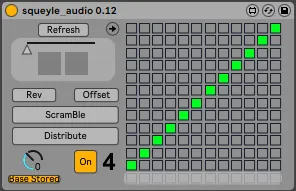
___DISTRIBUTE a scale across several tracks. (up to 12, max one note per track.) It's a kind of "hocket" technic but with scales.
___SCRAMBLE several track's scale (each track will be scrambled independantly but still in their scale, common or not)
___MORPH (chromaticaly) in real time up to 12 tracks between 2 different scales (shift+click on the 2 presets and move the automatable slider)
I don"t know if this device is working with Live 12,
I"m stiiiill on the beta waiting list
:/
SETUP____________
___note that this device doesnt do anything "alone", it just controls and "synchronises" the "scale devices" of the live set
___insert a stock "scale" midi device on each track you want to be procedded (grouping/nesting a scale device will exclude it)
___insert Squeyle in an audio track (or master)
___press REFRESH if the bold number at the bottom of the device do not indicate the number of scale/track detected.(sometimes has to.be pressed twice..Press Refresh each time you add/move/delete a track or scale device.)
___create/draw a scale in Squeyle (note that the bottom row acts as "no note" and there is no 13th row)
___all proceded tracks now share the same scale.(note that this device controls all the 1st "scale" midi devices in each track, that are not in a rack. The device cannot control more than 12 scale devices/tracks.
___ shift+click the 1st preset square slot to save the scale.
___click Scramble or Distribute or tweak the matrice or whatever..
___shift+click the 2nd preset slot
___to hear the result you have to send in each proceded midi tracks the same (or not) clip or realtime playing while tweaking the device
___map the slider and/or use :
___REV / OFFSET to reverse or offset by one semi tone all the scale/tracks
___the LIVE DIAL to allows to transpose all the tracks within the current scale.
___BASE STORING makes the "base" of each Scale device to be saved/recalled or not
NOTES
beta releases with some bugs.
veeeery old and veeeery messy "draft device"/"proove of concept" patch that the announcement of Live 12 makes me remember of...