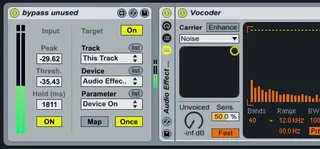
bypass unused - save CPU
In FLStudio there is an option, which automatically turns of...
- Type
- Audio Effect
- Author
- Bert
- Version
- 1.0
- License
- None
- Live version
- 9.0.6
- Max version
- 6.1.4
- Downloads
- 950
- Updated
- 2014-01-16
bypass unused - save CPU is an Audio Effect for Ableton Live by Bert, distributed as freeware, with no license specified by the author. It targets Live 9.0.6 and Max 6.1.4. On maxforlive.com it has 950 downloads. First published 2014-01-14, last updated 2014-01-16. 8 user comments below.
New to Max for Live? Read what Audio Effects do, how device licenses work, how to install a device.
Description
In FLStudio there is an option, which automatically turns off effects that aren't used to save CPU. I made this device with the same intention.
- Put it at the end of you effects chain. I recomend to put all of the chains effects into an effect rack.
- Map the device to the "device on" button of the rack.
- Set the Threshold of the Input detection. Now every time the output of the effects chain (which is the input of the device) falls below the set threshold, the effects rack is turned off and CPU is saved!
- You can also set a "hold-time". This way the devices waits the set amount of ms to turn the effects rack off. Might be necessary when using delays e.g.
You can also use it with synthesizers!
For feedback and suggestions: [email protected]
Comments (8)
cheers
Bert
thanks
At this moment it is useful only, when you use particular sound only ONE time during performance.