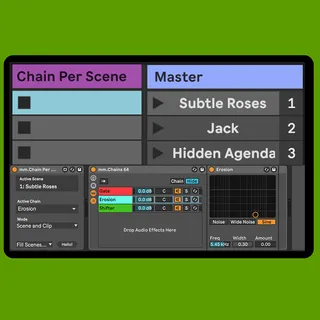
mm.Chain Per Scene
Simplify your Live set by linking an audio effect or instrum...
- Type
- Audio Effect
- Author
- MessinkiMusic
- Version
- 2.1.1
- License
- Commercial
- Live version
- 11.0.5
- Max version
- 8.1.5
- Downloads
- 0
- Updated
- 2021-08-07
mm.Chain Per Scene is an Audio Effect for Ableton Live by MessinkiMusic, distributed as a commercial (paid) device. It targets Live 11.0.5 and Max 8.1.5. First published 2021-07-28, last updated 2021-08-07. 1 user comment below.
New to Max for Live? Read what Audio Effects do, what the Commercial license means, how to install a device.
Description
Simplify your Live set by linking an audio effect or instrument chain to each scene in your set
Features
-Selects and routes audio through any chain by simply launching or selecting scenes or clips
-Automatically selects and shows the active chain for easy editing
-Saves CPU by turning off all instruments and effects except those in the active chain
-Well documented max patch to show how it all works
-30 day money back guarantee
-Fast email support at [email protected]
You Will Get
Two Max for Live devices, one that controls audio effect racks, and one that controls instrument racks
8 rack presets that are setup to work with the devices. They are fully customisable and simply work as a template that will save you time setting up
Demo Live set that walks you through all of the features
UPDATES
29/06/2021 Version 2.1.1
All buttons are now hidden from Live's mapping system
29/06/2021 Version 2.1
Fixed a bug that stopped the chain selector from moving in certain situations
Comments (1)